TTSReader Text to Speech Extension for Chrome

TTSReader Text to Speech Extension for Chrome

0.0
Download unavailable
Screenshot 1

Description

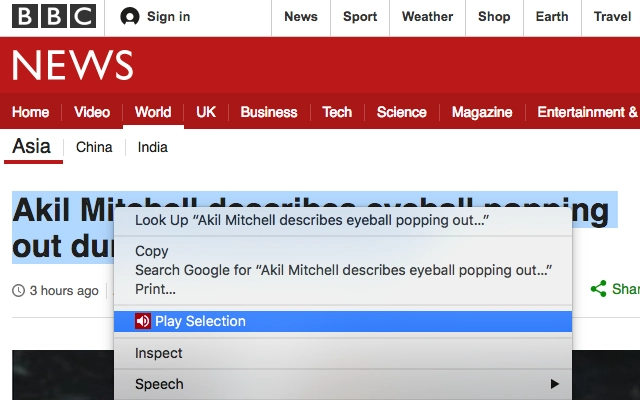
Enhance your Chrome with in-page speech capabilities.Listen to news, wiki articles & more, directly on their websites.Reads any website, without having to copy text or leave the website.NEW: keyboard shortcuts: play/pause by clicking shift+alt+downArrowIncluding readability-mode. Transform your page to main-content-text only. Remove clutter - focus on the article. Togetherwith customizable font size and printer-friendly options.Main Features:Reading whole pagesSelect text on the page -> right mouse click menu -> read selectionEdit the text to be readRemembers text and caret position - so you can pause and later continue.Marks the currently read sentence, so you can follow the reading.Multilingual / accents.all your website reading needs in a simple, efficient and intuitive manner! The extension is super simple to use and, a professional text to speech. The extension allows for instant reading of text with natural sounding voices, directly from within any website.The extension's icon will be placed right on your Chrome's toolbar, so it will always be available without exiting your working tab. In addition, you can simply select the text you want to be read, and click "Speak" right from the popup context menu upon the right-mouse-click.Full offline supportThe ttsreader chrome extension has a set features and functionality that allow you to control and customize your listening experience.• Choose a language (or accent) from a list.• Control and vary dictation speeds• Play and pause buttons• Reset reader button• Load/Reload page text• Load the text into a textbox and follow with the assist of highlighted segments• Hear text via selection and use of the right click menu!• Listen and continue browsing on other sites.Uses of the TTSreader extenstion:• While working, listen to interesting articles and books• TTSReader allows for listening to written content while doing something else.• Educational for Kids• Aid for people with difficulties in reading• Narrating & dubbing movies, presentations & moreTtsreader is particularly suited for content based websites, eg Wikipedia articles.Privacy: We at TTSReader.com value your privacy, and that's why we do not store anything you type or any other data about you.For additional info & feedback, please contact us at [email protected], 
For TTSReader for PCs, iOS (on Safari), desktops, laptops, go to http://ttsreader.comEnjoy listening!

TotalVirus Scanned

This software has been scanned for malware and verified safe for download.

Guides & Tutorials for TTSReader Text to Speech Extension for Chrome

How to install TTSReader Text to Speech Extension for Chrome
  1. Click the Preview / Download button above.
  2. Once redirected, accept the terms and click Install.
  3. Wait for the TTSReader Text to Speech Extension for Chrome download to finish on your device.
How to use TTSReader Text to Speech Extension for Chrome

This software is primarily used for its core features described above. Open the app after installation to explore its capabilities.

User Reviews for TTSReader Text to Speech Extension for Chrome 0

    No reviews found

Similar Apps

Recommended Apps

diados

diados

Extension

Download Apps
diados

diados

Extension

Download Apps
读取 USB 与串行接口设备的数据 App for Chrome

读取 USB 与串行接口设备的数据 App for Chrome

Extension

Download Apps
思维简图 App for Chrome

思维简图 App for Chrome

Extension

Download Apps
Relax.li ☯ App for Chrome

Relax.li ☯ App for Chrome

Extension

Download Apps